Developer synopsis
1. Languages and tools
Java
-
Java is a high-level, object-oriented programming language known for its portability, security, and robustness.
-
The code samples and examples provided in this documentation are written in Java.
Spring Tool Suite (STS)
-
Spring Tool Suite (STS) is an eclipse-based development environment tailored for developing Spring applications.
-
It provides a comprehensive set of tools for Java developers, including features for rapid application development, debugging, testing, and deployment.
Features of STS
-
Built-in support for Maven and Gradle build systems.
-
Code assistance and navigation for spring-specific annotations and configurations.
-
Integrated debugging tools for efficient troubleshooting.
-
Seamless deployment capabilities for deploying spring applications to various environments.
Spring MVC
-
Spring Web MVC is the original web framework built on the Servlet API and has been included in the Spring Framework from the very beginning.
-
Spring MVC is a web framework based on the Model-View-Controller pattern
-
Model:Manages application data and business logic. -
View:Renders the UI (e.g., HTML, JSP). -
Controller:Handles user requests, processes data, and returns a view. -
DispatcherServlet:Routes requests to appropriate controllers. -
Annotations:Simplifies routing (@Controller, @RequestMapping) and form handling.
-
-
It provides a clean separation of concerns, making web apps easier to develop and maintain.
System requirements
-
Operating system: Windows, macOS, Linux
-
Java Development Kit (JDK): Version 17 (or higher)
-
Minimum RAM: 2 GB (4 GB recommended)
-
Disk space: 500 MB for STS installation, additional space for projects
Installation
-
Download the latest version of Spring Tool Suite (STS) 4.16 from the official website.
-
Follow the installation instructions provided for your operating system.
-
Launch STS and configure any additional settings as needed.
2. Project structure
2.1. Package structure
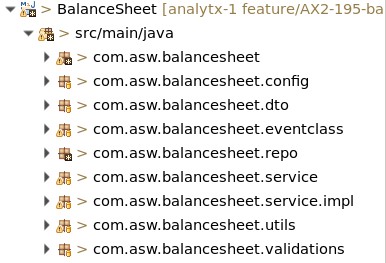
In Spring MVC, organizing your project into a clean and modular package structure helps maintain clarity and separation of concerns. Here’s a common and effective package structure:
com.example.projectname
-
Root package for the application.
controller
-
Contains all the controllers responsible for handling HTTP requests.
-
Example: HomeController.java, CounterPartyController.java.
service
-
Holds the business logic and service layer.
-
These classes interact with the repositories and perform complex operations.
-
Example: UserDetailsService.java, CounterPartyTreeService.java.
repository
-
Contains the data access layer, typically interfaces extending Spring Data JPA’s CrudRepository or JpaRepository.
-
Example: CounterPartyRepository.java, UserDetailsRepository.java.
model or entity
-
Contains the data models or entity classes that map to database tables.
-
Example: CounterPartyTree.java, UserDetails.java.
dto (optional)
-
Data Transfer Objects to encapsulate request/response data between layers.
-
Example: CreateDto.java, ResponseDto.java.
config
-
Contains configuration classes for the application, like security, MVC settings, or database configurations.
-
Example: PropertyConfig.java, JpaConfig.java.
exception (optional)
-
Custom exception classes for handling errors in a unified way.
-
Example: UserNotFoundException.java, GlobalExceptionHandler.java.
util (optional)
-
Utility or helper classes for common functions like date conversion or string manipulation.
-
Example: CommonUtil.java, Constants.java.
This structure ensures clear separation between layers (controllers, services, data, etc.) and promotes scalability and maintainability in Spring MVC applications.
2.2. Coding standards
Coding standards for Spring MVC promote consistency, readability, and maintainability.
-
Package naming and structure
-
Use lowercase for package names (
com.example.projectname.controller). -
Organize packages by function (e.g.,
controller,service,repository,model) to keep clear separation of concerns.
-
-
Class naming
-
Controllers should end with
Controller(e.g.,UserController). -
Services should end with
Service(e.g.,UserService). -
Repositories should end with
Repository(e.g.,UserRepository). -
DTOs should end with
Dto(e.g.,UserDto) and exceptions withException.
-
-
Annotations
-
Use
@Controlleror@RestControllerfor controller classes. -
Use
@Servicefor service classes and@Repositoryfor repository classes. -
Use
@RequestMappingor HTTP-specific mappings (@GetMapping,@PostMapping) on methods to improve readability.
-
-
Dependency injection
-
Use constructor-based injection for dependencies, which is more testable and aligns with immutability principles.
-
Avoid field injection, as it reduces flexibility and testability.
-
-
Error handling
-
Use
@ControllerAdviceand@ExceptionHandlerfor global error handling. -
Create custom exceptions for specific cases and wrap them in meaningful error messages for client responses.
-
-
Method naming
-
Follow RESTful naming conventions (
getUserById,createUser,updateUser,deleteUser) for clarity. -
Keep method names descriptive and precise.
-
-
Logging
-
Use
LoggerFactory.getLogger(ClassName.class)and log at the appropriate levels (INFO,WARN,ERROR) instead of usingSystem.out.println. -
Log important events, errors, and user actions.
-
-
DTO and Model separation
-
Use DTOs to encapsulate API request/response data to separate external models from internal entities.
-
Map DTOs to entities in the service layer, often with libraries like MapStruct.
-
-
Validation
-
Use
@Validand@Validatedwith DTOs for validation and specify constraints using annotations like@NotNull,@Size, and@Pattern. -
Handle validation exceptions using a global
@ControllerAdvice.
-
-
Code consistency and formatting
-
Follow standard Java conventions:
CamelCasefor classes,camelCasefor methods and variables, and{ }braces on new lines. -
Document classes and methods with Javadoc comments, especially public methods in controllers and services.
-
3. Dependencies and libraries
Dependencies
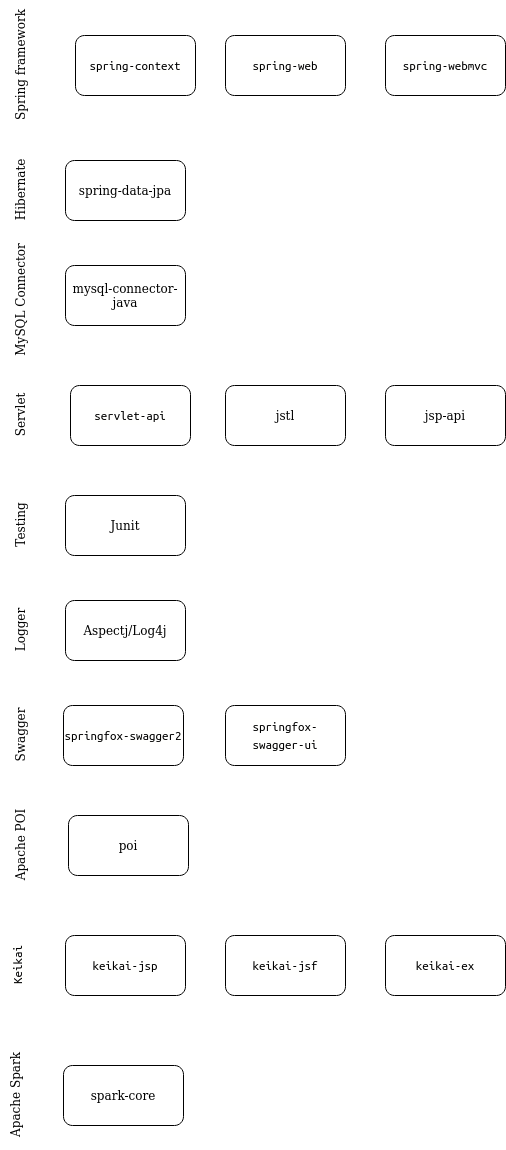
-
spring-context
-
Purpose: The spring-context dependency provides core components of the Spring Framework, enabling dependency injection, application context management, and other foundational features like event propagation and resource loading.
-
Usage: Commonly included in Spring applications to manage beans, facilitate dependency injection, and create and configure the ApplicationContext, which serves as the central container for Spring beans and configurations.
-
-
spring-web
-
Purpose: The spring-web module provides foundational web functionalities within the Spring Framework, enabling the development of RESTful APIs and web applications through essential components like servlets, filters, and REST controllers.
-
Usage: Commonly used in Spring MVC applications to handle HTTP requests, create REST endpoints with @RestController and @RequestMapping, and support JSON/XML responses, forming the basis for web and API layers in Spring-based projects.
-
-
spring-webmvc
-
Purpose: The spring-webmvc module is the core component for building web applications with Spring MVC, providing a comprehensive framework for implementing the Model-View-Controller (MVC) design pattern in Java applications.
-
Usage: Commonly used to create web applications and RESTful APIs by defining controllers, mapping requests with annotations like @Controller and @RequestMapping, and managing views, making it essential for handling and routing HTTP requests and responses in Spring MVC applications.
-
-
spring-data-jpa
-
Purpose: spring-data-jpa is a Spring module that simplifies data access in JPA-based applications by providing repository support, reducing the need for boilerplate code and enhancing interaction with relational databases.
-
Usage: Commonly used to interact with databases through the JpaRepository interface, which provides CRUD operations, pagination, and query methods, making database access straightforward and allowing developers to focus on business logic rather than data handling.
-
-
mysql-connector-java
-
Purpose: MySQL is an open-source relational database used to store, manage and retrieve structured data efficiently for applications. It’s suitable for both small-scale projects and large, data-intensive systems.
-
Usage: MySQL uses SQL (Structured Query Language) to interact with databases, supporting CRUD operations (Create, Read, Update, Delete) and advanced features like transactions, indexing and joins for complex data relationships.
-
-
servlet-api
-
Purpose: The servlet-api provides the core classes and interfaces for handling HTTP requests and responses in Java web applications, forming the foundation for Java Servlets, which are essential for creating dynamic web content.
-
Usage: Used in web applications to define servlets, filters, and listeners, which manage and process HTTP requests and responses, typically serving as a base for frameworks like Spring MVC to build on for handling web interactions.
-
-
jstl
-
Purpose: JSTL (JavaServer Pages Standard Tag Library) provides a set of standard tags for JSP (JavaServer Pages) to simplify common tasks like iteration, conditional processing, internationalization, and formatting within web pages.
-
Usage: Commonly used in JSP pages to streamline dynamic content creation by reducing the amount of Java code, making it easier to work with loops, conditionals, and data formatting directly in HTML templates, improving readability and maintainability.
-
-
jsp-api
-
Purpose: The jsp-api provides the core classes and interfaces necessary for JavaServer Pages (JSP) technology, enabling dynamic content creation in Java web applications.
-
Usage: Used in web applications to support JSP files, allowing developers to embed Java code within HTML for generating dynamic web content, handling form submissions, and displaying data from backend services in a web-friendly format.
-
-
junit
-
Purpose: JUnit is a widely used testing framework for Java, designed to facilitate the creation and execution of unit tests, allowing developers to test individual components of their applications for correctness.
-
Usage: Used in Java applications to write repeatable tests for methods and classes, typically annotated with @Test, enabling automated testing to verify code behavior, detect bugs early, and ensure code reliability throughout development.
-
-
log4j
-
Purpose: Logging framework for generating log messages.
-
Usage: Logging information, warnings, errors, etc. during application execution.
-
-
springfox-swagger-ui
-
Purpose: Springfox Swagger UI is a library that integrates with Spring applications to automatically generate interactive API documentation using the Swagger/OpenAPI specification, providing a user-friendly interface for exploring and testing RESTful APIs.
-
Usage: Commonly used to annotate controller methods in a Spring application, allowing developers to easily visualize and interact with the API endpoints through a web-based interface, which enhances API usability and improves the developer experience.
-
-
springfox-swagger2
-
Purpose: Springfox Swagger 2 is a library that integrates Swagger support into Spring applications, automatically generating API documentation in the Swagger format, making it easy to document and test RESTful endpoints.
-
Usage: Used in Spring applications to generate interactive API documentation by annotating controllers and models. This documentation is accessible through the Swagger UI, allowing developers and clients to visualize, test, and understand API endpoints.
-
-
Apache POI
-
Purpose: Apache POI is a Java library that enables reading, writing, and manipulating Microsoft Office file formats, such as Excel (XLSX, XLS), Word (DOCX, DOC), and PowerPoint (PPTX, PPT).
-
Usage: Commonly used for generating reports, automating document handling, reading or writing spreadsheet data, and creating or modifying Word documents and presentations programmatically in Java applications.
-
-
keikai-jsp
-
Purpose: Keikai JSP is an integration library that allows the Keikai spreadsheet to be embedded in JavaServer Pages (JSP) applications, enabling interactive, Excel-like spreadsheet functionality within web applications.
-
Usage: Used in JSP-based web applications to display and edit spreadsheet data in a browser, allowing users to interact with spreadsheet cells, formulas, and data directly in the web interface, ideal for applications requiring complex data entry or calculations.
-
-
keikai-jsf
-
Purpose: Keikai JSF is a library that integrates the Keikai spreadsheet into JavaServer Faces (JSF) applications, enabling developers to embed Excel-like spreadsheet functionalities within JSF web applications.
-
Usage: Used in JSF applications to provide users with an interactive spreadsheet experience, allowing them to manipulate data, perform calculations, and utilize rich spreadsheet features directly in the browser, which is beneficial for applications that require extensive data management capabilities.
-
-
keikai-ex
-
Purpose: Keikai EX is a library designed to extend the capabilities of the Keikai spreadsheet component, providing advanced features for embedding and manipulating spreadsheets within Java applications.
-
Usage: Used in Java applications to offer enhanced spreadsheet functionalities, such as importing and exporting data in various formats (like Excel), advanced data visualization, and improved performance, making it suitable for applications that require sophisticated spreadsheet handling and integration.
-
-
spark-core
-
Purpose: Spark Core is the foundational module of Apache Spark, providing essential functionalities for distributed data processing, including task scheduling, memory management, and fault tolerance.
-
Usage: Commonly used to build data processing applications and pipelines that can efficiently handle large-scale data across clusters, supporting operations like transformations and actions on distributed datasets with high performance and ease of use.
-
-
gson
-
Purpose: The gson dependency provides support for JSON serialization and deserialization in Java applications. It allows you to convert Java objects to JSON format and vice versa, making it easy to work with JSON data in your Java applications.
-
Usage: Include the gson dependency in your project to use Gson’s functionality for handling JSON data. You can use Gson’s APIs to parse JSON strings into Java objects, serialize Java objects to JSON strings and perform various operations on JSON data. This library is commonly used in Java projects to interact with RESTful APIs, process JSON data from web services and more.
-
-
hibernate-entitymanager
-
Purpose: Hibernate EntityManager bridges the gap between JPA and Hibernate, allowing developers to use the standard JPA EntityManager API while leveraging Hibernate’s powerful ORM features. It manages the lifecycle of persistent entities and allows data manipulation through object-oriented principles rather than direct SQL.
-
Usage: Provides methods to manage entities, enables transaction management and supports both JPQL (Java Persistence Query Language) and native SQL queries, allowing complex data retrieval through
createQuery()andcreateNativeQuery().
-
-
commons-codec
-
Purpose: Apache Commons Codec provides simple encoding and decoding utilities for data formats like Base64, Hex, and cryptographic hashes in Java.
-
Usage: Commonly used for Base64 and Hex encoding/decoding of binary data and hashing with algorithms like MD5 or SHA-256 for security and data integrity.
-
-
c3p0
-
Purpose: C3P0 is a Java library providing database connection pooling, which optimizes resource management by reusing database connections rather than opening a new connection for each database request.
-
Usage: Integrated with Hibernate or JDBC configurations to manage database connections more efficiently, improving performance and scalability in applications by reducing the overhead of frequent connection creation and closing.
-
-
cglib
-
Purpose: CGLIB (Code Generation Library) is a Java library used to generate dynamic proxy classes at runtime, primarily for method interception and class enhancement.
-
Usage: Often used in frameworks like Spring for creating proxies of classes without interfaces (through subclassing), enabling features like lazy loading, AOP (Aspect-Oriented Programming), and method caching by intercepting method calls dynamically.
-
-
commons-collection
-
Purpose: Apache Commons Collections is a library that extends Java’s native collections framework, providing additional collection types, utilities, and algorithms to simplify data handling and manipulation.
-
Usage: Commonly used for advanced collection types (e.g., Bag, BidiMap, MultiMap), decorators, and utility methods that facilitate tasks like filtering, transformation, and ordering of collection elements in Java applications.
-
-
commons-logging
-
Purpose: Apache Commons Logging provides a lightweight, standardized logging interface that acts as a bridge between different logging frameworks (like Log4j, Logback, and java.util.logging), allowing for flexible logging in Java applications.
-
Usage: Commonly used to enable logging without committing to a specific logging framework, making it easy to switch between logging implementations by configuring the underlying logging framework (e.g., Log4j or SLF4J) without changing application code.
-
-
dom4j
-
Purpose: DOM4J is a Java library used for working with XML, providing an easy-to-use and flexible API for parsing, creating, modifying, and navigating XML documents.
-
Usage: Often used to handle XML data in Java applications where complex XML document processing is required, supporting XPath, XSLT, and integration with SAX and DOM parsers for versatile XML manipulation.
-
-
hibernate-core
-
Purpose: Hibernate Core is the primary module of Hibernate, a popular Java-based ORM (Object-Relational Mapping) framework, allowing seamless mapping between Java objects and database tables.
-
Usage: Used to manage database interactions by mapping Java classes to database tables and handling CRUD operations, relationships, caching, and lazy loading, making data persistence in Java applications more intuitive and reducing the need for extensive SQL code.
-
-
modelmapper
-
Purpose: ModelMapper is a Java library designed to simplify the process of mapping between objects, particularly for converting data transfer objects (DTOs) to entity objects and vice versa.
-
Usage: Commonly used in applications to reduce boilerplate code associated with manual object mapping, allowing for straightforward configuration and automatic handling of nested properties and collections, improving code maintainability and readability.
-
-
jackson-databind
-
Purpose: Jackson Databind is a component of the Jackson library that provides functionality for converting Java objects to JSON and vice versa, enabling easy serialization and deserialization of data.
-
Usage: Commonly used in Java applications to facilitate JSON processing, especially in RESTful web services, allowing seamless conversion of Java objects to JSON responses and parsing JSON requests into Java objects.
-
-
lombok
-
Purpose: The lombok dependency simplifies Java development by providing annotations that automatically generate boilerplate code, such as getters, setters, constructors, and toString methods.
-
Usage: Use to annotate Java classes with lombok annotations to reduce the amount of boilerplate code they need to write, resulting in cleaner and more maintainable codebases.
-
Libraries
-
ACTUS libraries
-
ACTUS provide open, royalty-free standards for the combined data and algorithmic representation of financial contracts in order to promote efforts for transparent interoperability of financial contract information as well as support the use of the ACTUS standards and open source software in developing a broad range of applications and systems that utilize the forward-looking cash flow analysis that ACTUS enables and which can provide major benefits for both private and public sectors of the financial industry.
-
Example
-
aswContractTypes,aswRiskfactors,integrator,ACTUS-Util,ACTUS-Misc,ACTUS-ContractTypes,ACTUS-DataUtil, etc.
-
-
4. Database
MySQL
-
MySQL is a popular open-source relational database management system (RDBMS) widely used for web and application development. Known for its speed, reliability and ease of use, MySQL manages data in structured tables using SQL (Structured Query Language), supporting essential operations like querying, inserting, updating and deleting records.
-
It features powerful capabilities such as indexing, transactions and foreign key constraints to enforce data integrity and optimize performance.
-
MySQL is compatible with various platforms and can be integrated with languages like Java, PHP and Python, making it versatile for applications ranging from small projects to large, data-intensive enterprises.
-
Additionally, its support for replication, clustering and high-availability configurations makes it suitable for high-demand environments.
5. Security and authentication
In Spring MVC, security and authentication are often implemented with Spring Security for robust, customizable protection. Encryption and decryption are key elements of securing sensitive data in transit and at rest.
-
Security & Authentication
-
Authentication-
Verifies user identities through credentials (username, password, tokens). Typically implemented via form-based login, HTTP Basic Auth, or OAuth. Spring Security manages session handling, login/logout, and access control.
-
-
Authorization-
Determines access rights after authentication, using roles or permissions. Securing endpoints with @PreAuthorize or @Secured annotations is common.
-
-
-
Encryption & Decryption
-
Data Encryption-
Ensures that sensitive data, like passwords, are encrypted before storage, often using libraries like Jasypt or Spring Security’s BCryptPasswordEncoder for password hashing.
-
-
Data Transmission-
HTTPS (TLS) encrypts data in transit. Additionally, sensitive data within requests or responses can be encrypted with libraries like Apache Commons Codec or Jasypt.
-
-
6. Bitbucket repository
The project repository is hosted on Bitbucket, a web-based version control platform that utilizes Git for tracking changes to the source code. This section provides guidance on accessing, managing, and contributing to the repository.
Accessing the repository
To access the repository, appropriate permissions needed to be granted by the project administrators. Once granted access, follow these steps:
-
Clone the repository : Use the following command to clone the repository to the local machine:
git clone <repository_url> -
Authentication : Depending on your setup, you may need to authenticate with your Bitbucket credentials. Use SSH or HTTPS based on your preference and configuration.
Setup personal SSH keys on linux
|
Refer : Setup personal SSH keys on linux |
Branching strategy
A branching strategy is followed to manage feature development, bug fixes, and releases effectively. The main branches in the repository are:
-
master : Represents the latest stable version of the project.
-
develop : Serves as the integration branch for ongoing development work.
-
feature branches : Created for new features or significant changes. Prefix feature branches with
feature/. -
bugfix branches : Created to fix bugs found in the development or production environments. Prefix bugfix branches with
bugfix/. -
release branches : Created for preparing releases. Prefix release branches with
release/.
Workflow guidelines
When working with the repository, adhere to the following guidelines:
-
Create feature branches : For each new feature or change, create a dedicated feature branch from the
developbranch. -
Commit frequently : Make small, logical commits with clear messages to track changes effectively.
-
Pull request process : Before merging changes into the
developormasterbranches, submit a pull request. Ensure code review and necessary testing are completed before merging. -
Resolve conflicts : In case of conflicts during merges, collaborate with team members to resolve them promptly.
Additional resources
For further assistance with Bitbucket features, refer to the Bitbucket documentation.
-
Bitbucket documentation
|
Refer : Bitbucket Guide |
7. Logging
Logs are essential in software development for tracking application behavior, troubleshooting issues, and monitoring performance. In a Spring MVC application, logging allows developers to gain insights into the flow and health of the system.
-
Log levels
-
Common levels include
DEBUG,INFO,WARN,ERRORandFATAL. Each level indicates the importance or severity of a message. -
For example,
INFOlevel logging is used with logger.info("enter into counterparty create"); to track entry into the method.INFOis typically used for general messages that confirm the application is functioning as expected.
-
-
Logger configuration
-
Configuring loggers by module or functionality allows for finer control over what is logged and at what level, which can be customized in an external configuration file (e.g.,
log4j.propertiesorapplication.properties).
-
-
Logging frameworks
-
Spring applications often use SLF4J (Simple Logging Facade for Java) with Logback or Log4j as the underlying logging implementations.
-
Using SLF4J with Logback or Log4j is generally preferred as they offer flexible configuration, log file rotation and asynchronous logging capabilities.
-
-
Best practices for logging
-
Avoid Logging sensitive data
-
Be cautious not to log sensitive information, like passwords or personal details, to protect user privacy.
-
-
Structured logs
-
Use structured logs (e.g., JSON format) for easier parsing by log aggregation tools.
-
-
Log contextual information
-
Include relevant context (like method name or unique IDs) to help trace specific requests or transactions.
-
-
Error Logging
-
Log errors and exceptions with stack traces to quickly identify issues. For example, use
logger.error("error message", exception);for detailed error tracking.
-
-